Common Errors Meet in 3D Printing and Caused Causes
During the process of working with 3D printing technology, whether new or experienced people, an error occurred during the printing period that was almost inevitable. The fact is, a lot of failed printings are not due to poor quality machines, but from the unsuited digital settings, poorly used materials or design files. Understanding the common errors will help the user to be more active in the printing process, reduce waste and enhance product quality.
Early print class error not following table
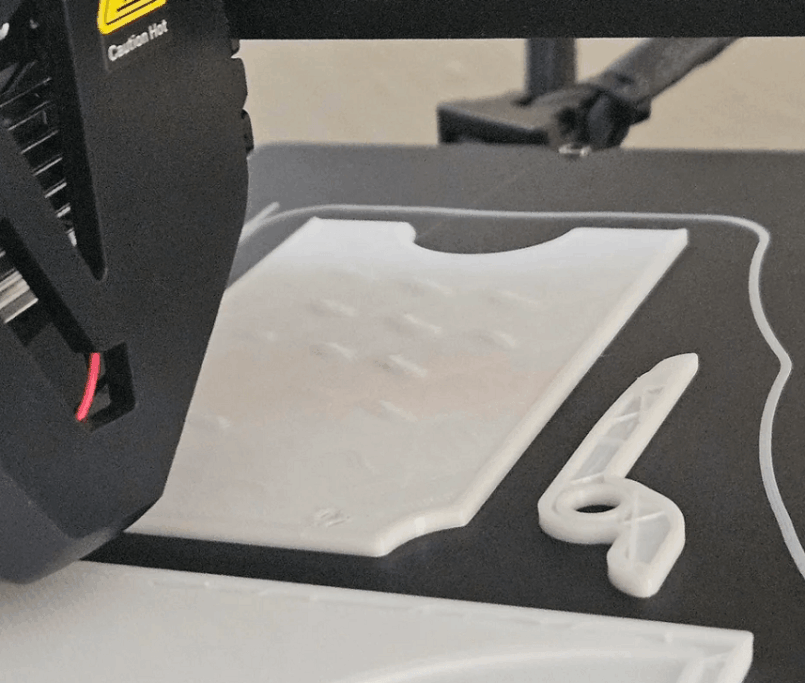
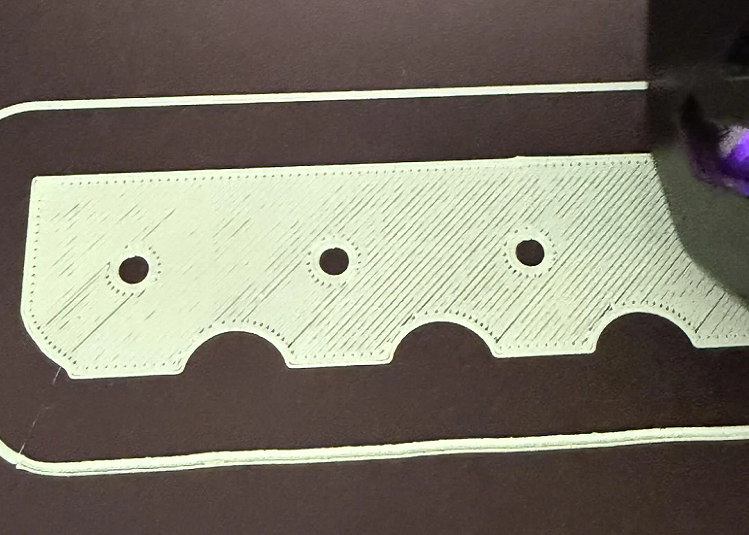
This is the most common error and is the cause of many new people using 3D printing machines. When the first printing class does not hold fast to the print table, the product is easy to deflect, bend up, or be swept along the tip of the spray after only a few minutes of printing.
The main cause of this condition often stems from the underweight printing table, the distance between the spray head and the table surface is not suitable or the printing table temperature is not yet required for the material used. Also, the dirty, hand oiled or dust table surface greatly reduces the gripability of the material.
In fact, just spending more time on the carefully printed table, cleaning the table face in front of each print case and re-adjusting Zoffset was able to dramatically improve the situation. With some hard-to-hold materials, users can use extra glue or special print surface to increase stability for the first printing class.
Failed to bend product during print
The conga is a bottom or corner phenomenon of the product that is lifted up from the print table, causing the details to lose the original form. This error often occurs when printing details of large bottom area or using high-tension materials.
The main cause is the dissimilar temperature change between print layers. When the material gets too fast, it contractes and pulls up the corners of the product. The printing environment is unstable, with wind or low room temperature also making the curved condition more frequent.
To restrict this error, users need good control of the table temperature, restrict the wind blow directly into the print area and use additional brim or raft to increase the area exposure to the print table. With technical materials, the printing in a closed chamber helps to keep the heat stable and significantly reduced the risk of curved.
Other Organiser
The lack of materials is an error that causes the print to look hollow, irregular layers, and the mechanics of the product are significantly reduced. When this error occurs, the product's surface usually has small gaps, the print line is inexact.
The common cause is that the spray head is partially blocked, the filament gear slips or the filament is wet after the long preservative lengths incorrectly. In addition, the establishment of a chromium ratio of the material is not accurate or too low at the tip of the spray also prevents the plastic flow.
During the actual use of the use of the first-rate spraying period, drying the filament prior to printing and editing the flow parameters will help to significantly reduce the missing povray error. This is an error that needs to be processed early as it directly affects the quality and durability of print products.
Other Organiser
In contrast to the missing amphithropy, an overmaterial error occurs when the printer releases more plastic than required. As a result, the product's surface becomes rugged, details lost and the actual size are no longer consistent with the original design.
The main cause comes from setting up too high the flow system, giving false claims to the filament diameter or to the early spray temperatures that exceed the recommendations of the material. In many cases, users do not measure the actual filament diameter which uses the default census, leading to a mismatch in the printing process.
The relative fixation is simple, just re-adjusting the flow, checking filament's parameters and reducing the precipitation temperature for the right level. Preview of small templates before printing the official product also helps to detect this error early.
Parsing layer between print classes failed
Separating the layer is an error that makes the printing classes not closely linked, leading to the easily broken or broken product when under pressure. This error is often not easily recognized from the surface, but it has a huge impact on the sustainability of the details.
The common cause is that the output temperature is too low, making layers of material not hot enough to stick. In addition, the cooling fan works too hard or the too cold print environment also cools the front layer quickly, reducing the bond between layers.
In fact, a slight increase in the spray head temperature, depletion of the cooling fan and maintaining a stable printing environment will greatly improve the separation of the layer. With hard-to-print materials, the use of a closed chamber is almost a mandatory solution.
Failed to drag plastic fibers during print
Pulling the plastic thread is an error that is common when printing details that have a wide range of gaps or multiple segments. The expression is that thin plastic fibers appear between the details, making the product less aesthetic and taking extra time handling the post-print.
The main reason is that plastic withdrawals have not yet been set to fit, that the output temperature is too high or the filament is wet. As the spray head moves from one position to another, the plastic continues to flow and form the fiber.
To limit this error, the user needs to adjust the retradition parameters, reduce print temperature, and maintain filament in dry environments. The optimization of the speed of the move also reduces the drag.
Print Layer Transfer Error
Printing class transfers are errors that cause layers to misplace themselves, making the product distorted or misshaped. This error often occurs unexpectedly during the print process and is difficult to fix when it occurs.
The cause is often associated with the mechanical system of the machine, such as the loose curora wire, the slide or the step engine that has been lost because of over-print speed. Also, vibrations during the printing process can cause this phenomenon.
The test and maintenance of the tertiary mechanical system, reduced printing speed and set the machine on the surface will certainly help to limit the class transition error.
Shaken and opaque print surface error
Some products after printing may appear on the surface with waves or shades repeated on the surface, especially visible in edges and angles. This is a surface vibration error, often happening when the printer operates at high speed.
The main cause is the mechanical vibrations, the engine frame is not hard enough or the acceleration parameters are set too large. When the machine shakes, the movement of the spray head is no longer absolutely accurate, leading to irregular print.
The solution is generally applied to reduce print speed, re-adjusting acceleration and increasing stability for the machine frame. Just optimize these parameters, the quality of the product surface will be significantly improved.
Could not close temporary folder: %s
Support is the required support when printing the partial release details. However, if the setting doesn't make sense, the sunport can hold too hard on the product, causing difficulty in removing and ruining the detailed surface.
The cause is usually due to the gap between the sunport and the surface of the product being too small or the density of the sunport was set too high. In many cases, the wrong selection of the support style also increased the unwanted level of cling.
To limit this error, users need to re-adjust the support distance, reduce density, and select the appropriate support style. Returning to set the product before printing also greatly reduces the need to use the support.
Failed to generate from the design file
Not all 3D printing errors originate from the printer. The design file failed, such as the uncontained model, the overlap grid or the invalid geometry data, which may also cause the print to have an incident.
Causes often come from the process of designing or exporting files incorrectly. When a bug file is inserted into the slicing software, the printer will not be able to accurately process and lead to errors during the printing process.
Check and edit files before printing with support software is required to ensure smooth print processes and products achieve desired quality.
Conclusion
Errors in 3D printing technology are inevitable, especially during the process of getting used to machines and materials. However, most errors can be restricted or overcome if the user understands the cause and has the right way of handling it. The acquisition of experience through each print, combined with the optimization of the parameters, will help to enhance the quality of products and harness efficiency of 3D printing technology in practice.