A 3D print error appears many Silk Striping and Revival
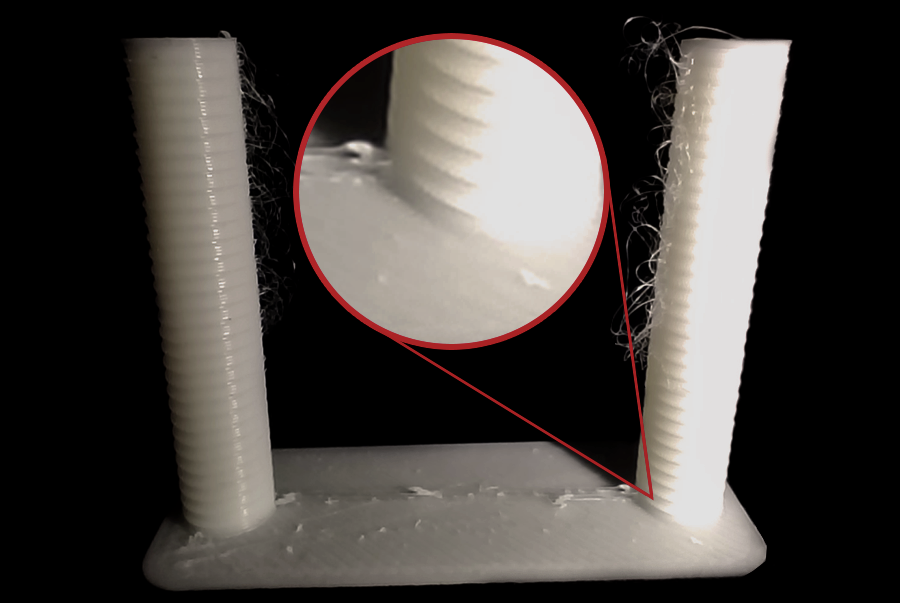
3d print error appearing multiple Striing plastic silks is the state of appearance Spider-like plastic fiber extends between details of the print model. These fibers formed as the tip moved from one position to another but the melted plastic continued to leak out.
Although this error did not completely damage the product, it greatly reduced the surface quality of the model. The osmosis causes the product to look inferior and sometimes hinder small details. In many cases, the user must take additional post-processing steps such as cutting the plastic fiber or using heat to clean the surface.
Striking phenomena typically appear when printing models with multiple separate details or large gaps. As nod moves between these positions, melted plastic is pulled into thin fibers. This error may occur with most common materials such as PLA, PETG or ABS if the technical parameters are not optimized.
In order to improve the quality of print, understanding the mechanism for the formation of Striking and the adjustment of the parameters in the slicer software is very important. When the parameters are set correctly, the pull of plastic fibers can significantly decrease.
What is a 3d print error appearing multiple stringing plastic silks?

3d print error appearing multiple plastic silks is phenomenon The melting plastic is pulled into thin fibers as the spray head moves between different print pointsYeah. During the printing process, when nobud completes part of the model and needs to move to the new position, the system will stop the plastic. However, if the plastic continues to leak out of its tip due to heat or pressure in hotend, the plastic fibers will form.
These fibers are usually very thin, sometimes only a few percent thick, but they can last between many details of the model. In printed plates with many small columns or empty structures, the phenomenon is more likely to appear because the spray head has to move through many gaps.
In the field of 3D printing, Striking is also known as OozingYeah. These two concepts often accompany each other. Oozing refers to plastic leaks out of nozard, while Striking is the result of that leaking process when nozard moves.
From the technical point of view, Striing is directly related to The pitch of melted plastic, the temperature of the spray and the retraculation mechanism of the printer. When these factors are not optimum, plastics are easily pulled into fibers.
Striking Error Identification
Strining phenomena are quite conspicuous after the printing process is completed. When observing the model, users can see thin plastic fibers that extend between parts of the product. These fibers are often like spider webs and can appear in various locations on the model.
In print editions that have multiple separate details, plastic fibers often appear between cylinders or small structures. When removing products from the printing table, users can see that the fibers still cling to parts of the model.
Some heavier cases may cause plastic fibers to accumulate into small pieces on the surface. This makes the product rough and requires much post-print processing.
Although this error usually affects only the surface, if the appearance is too much, it can interfere with mechanical details or reduce the accuracy of the model.
Causes of Strining Error in 3D Printing
The head temperature is too high.

For example, when PLA is printed at a temperature of 220°C or higher, plastic tends to flow stronger. In the process of moving between the print points, this surplus would pull into thin fibers.
A reduction in print temperatures to a level that is consistent with materials can significantly reduce this phenomenon. However, if the temperature is too low, plastic may not melt completely and cause the underextrusion error. So we need to find optimum heat through tests like stampature tower.
Installing Retraction without optimum
Retraction is the mechanism that helps pull the filament back a small space before nobud movesYeah. The purpose of this mechanism is to reduce plastic pressure in hotend to limit leaks.
If the distance is too small or the pace is too slow, the plastic can continue to flow out of the eruption. This causes the plastic fibers to form as nobud moves.
Printers Use System Direct Drive Usually the distance is smaller than the system. Bowden.
Popular References:
Direct Drive
Retradition Distance: 0.5 2 mm
Retraction Speed: 25 40 mm/s
Bowden
Retradition Distance: 4 7 mm
Retraction Speed: 40 60 mm/s
The optimization of this census is often the most important step to reducing Strining.
Move speed of print head
The speed of the move of nod when not printed is called Travel SpeedYeah. If this speed is too slow, noMD will move longer between the print points and the plastic has more time to leak.
On the contrary, when travel speed is high enough, the spray head will quickly cross the gap and reduce its ability to form plastic fibers.
In many popular 3D printer configurations, travel speed is usually set in intervals 120 200 mm/s.
Filament is wet
Filament absorbs humidity from the air that can cause many problems when printed 3D, including Striking. When we heat the moist air in hotend, the water evaporates and creates little bubbles.
These bubbles make the plastic flow unstable and easy to pull into fiber. This is why materials are like PETG, Nylon or TPU often need to be dried before printing.
Efficiency Existing Errors
To reduce Striking phenomena, users need to adjust some significant technical parameters in the slicer software as well as in the process of preparing materials.
First, check and adjust Fountain temperatureYeah. Try to reduce the temperature by step around 5°C until the amount of plastic fiber has declined but the quality of printing remains stable.
The next is optimum. Retradition Distance and Retraction SpeedYeah. These are the two parameters that have the greatest impact on the drag. A slight increase in the retraction distance may help reduce plastic pressure in hotend and limit the leak.
Also, the rise. Travel Speed also helps nod move faster between the print points, thus reducing dragability.
Users should also turn on support features in slicer as Combing Mode either Avoidion Permeters to limit nod moving through large gaps.
Finally, make sure that filament is available. preserve dry or dry before printingYeah. This is especially important for moist - absorbing materials.
The tringing is a common error in 3D FDM printing and often appears in the form of thin, spider-like plastic fibers between the details of the model. This occurs as the melting plastic continues to leak out of the nostalgia during the beginning moving between the print points.
The main causes include the over-high spraying head temperature, the unopposed retraction, low-motion speeds or moist filament. By correcting the technical parameters in slicer and controlling the quality of the material, users can significantly reduce this phenomenon.
When the printing press is properly optimized, the prints will have cleaner surfaces, more detailed and limited excess plastic fibers. If you want to learn more about regular 3D printing errors, the optimum number of printers and 3D printing applications in productionLet's follow up on the articles that go deep. DETSA to update the latest technical knowledge in this field.